

How To
AI Video Editing: How to Use AI Without Creating Slop

Artificial intelligence is everywhere. New AI tools promise to generate scripts, edit videos, create thumbnails and even produce entire films. And while some of these can be helpful, it’s terrifying how easy it has become to create AI slop – AKA low-effort, mass-produced content created with minimal human input.
We here at Storezar ignited the AI debate when we made a video about how to actually use AI for video editing without making slop. You can watch it above. This was our attempt to engage with AI and explore practical, useful ways to use it while retaining the soul of your video. Because if you’re watching our videos – and reading this – you don’t want to be making slop; you want to be making great content!
The Difference Between AI Video Editing and AI Slop
When AI is responsible for the idea, the script, the visuals and the finished video, it’s difficult to argue that much creative authorship remains. On the other hand, using AI to remove repetitive, technical work leaves the creative decisions where they belong: with the editor. In fact, it can open up a whole world of possibilities, enhancing your videos, but only when used in the right way.
It’s this philosophy we want to take forward as we discuss how to use AI in video editing. Rather than encouraging you to produce more content with less effort, the focus is on producing better content by spending more time on the important stuff and less time on repetitive technical work.
Four Practical Uses for AI Video Editing
1. AI Object Masking
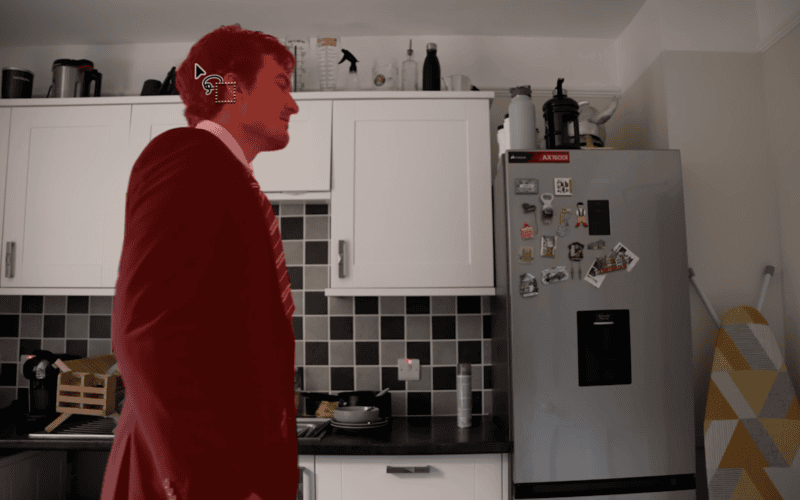
Perhaps the strongest use of AI in modern editing software is object masking.
Applications such as Adobe Premiere Pro and DaVinci Resolve now use AI to identify people and objects automatically, dramatically reducing the amount of manual rotoscoping editors need to perform.
Instead of painstakingly tracing subjects frame by frame, you can instead generate an accurate mask with a single click before making minor adjustments where needed. This is exactly the sort of task AI excels at. It doesn’t replace creative judgement; it simply removes hours of repetitive work.
In Premiere Pro, all you have to do is find the Object Mask Tool – it’s a new button in Premiere Pro. The video above shows how easily this can be deployed.
2. Background Replacement and Set Extensions
This is a way of enhancing scenes you have already filmed using small parts of generative AI. Basically, what you’re doing is taking a screenshot of your scene, taking that into Photoshop, and changing the scene using Photoshop’s magic wand tool. It’s that simple but is an easy way to digitally extend a scene.
Of course, you can argue this should be done on a filming level, but most YouTubers don’t have the budget for production designers, custom-built environments or dedicated camera crews. For independent creators filming from spare bedrooms or home studios, AI can provide a practical compromise that enhances the storytelling while keeping the creator firmly at the centre of the production. If unlimited resources were available, practical sets would always be preferable. But for creators working alone, AI can help bridge the gap between ambition and budget.
3. Cleaning Up Audio
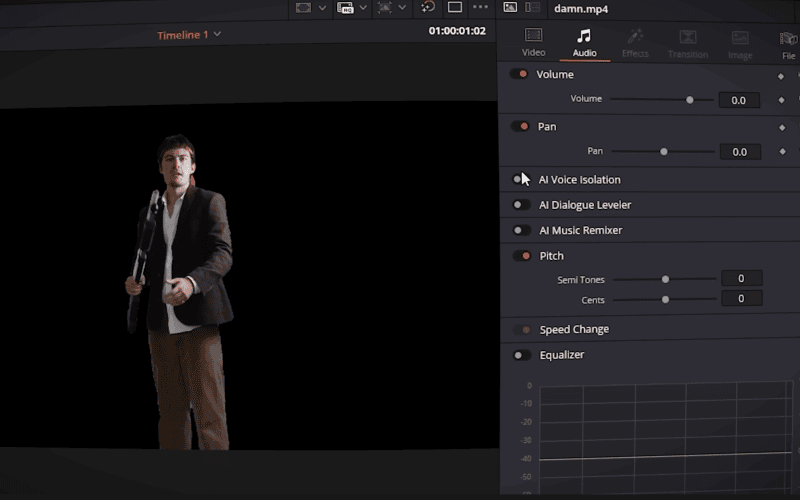
Visual effects often dominate conversations around AI, but some of the most useful applications happen behind the scenes.
DaVinci Resolve’s AI-powered audio cleanup tools can automatically reduce unwanted noise and improve dialogue clarity with very little manual intervention. Rather than changing the creative direction of a project, these tools simply improve the quality of what has already been recorded. It’s another example of AI acting as an assistant instead of a replacement.
4. Creating Seamless Video Transitions
This is the most controversial application featured in our video. We used Higgsfield’s AI tools to create a transition between two scenes, with AI creating that transition. The thing is, this was super hard to do, cost a lot of money, and the results were just not worth it.
Services like Higgsfield can be difficult to prompt consistently, require significant trial and error, and are expensive for independent creators. After experimenting with the platform, the cost is difficult to justify purely for creating transitions.
The Future of AI Video Editing
Whether you embrace AI or not, these tools are becoming a permanent part of modern editing software. The question is no longer whether you, our fellow editors, should use AI, it’s how you use it.
The strongest examples today aren’t the ones attempting to replace filmmakers altogether. They’re the features that remove technical barriers, allowing creators to spend more time writing better scripts, filming stronger performances and telling more engaging stories.
And if you want human-made tools, be sure to check out our presets and courses!
Share this: